The nodes are sourced from the internet, update date: 2026-10-02 #
-
Click the ‘Add Configuration File’ button
-
Example: copy the link below
- Node List
hysteria2://C0DD7bgChaltqnh%[email protected]:20000?sni=rmgyvpn.rest&obfs=salamander&obfs-password=C0DD7bgChaltqnh%2FT2az6ijM&insecure=0#KR%E9%9F%A9%E5%9B%BD%28mibei77.com%20%E7%B1%B3%E8%B4%9D%E8%8A%82%E7%82%B9%E5%88%86%E4%BA%AB%29
vless://[email protected]:8443?encryption=none&security=tls&sni=jp3.yohototo.top&fp=unsafe&type=ws&host=jp3.yohototo.top&path=%2Ftyxyws#HK%E9%A6%99%E6%B8%AF%28mibei77.com%20%E7%B1%B3%E8%B4%9D%E8%8A%82%E7%82%B9%E5%88%86%E4%BA%AB%29
vless://[email protected]:443?encryption=none&security=tls&sni=trackydev.site&fp=chrome&type=ws&host=trackydev.site&path=%2F#%E7%BE%8E%E5%9B%BD%2B%E6%95%99%E8%82%B2%E7%BD%91
vless://[email protected]:8443?encryption=none&security=tls&sni=fdghyt.com&alpn=http%2F1.1&fp=chrome&type=ws&host=fdghyt.com&path=%2Fvpn-wss%2Ffluxor%2F59011%2F#%E4%BF%9D%E5%8A%A0%E5%88%A9%E4%BA%9A%2BV2CROSS.COM
hysteria2://[email protected]:2060?sni=127.0.0.1&insecure=1#%E5%9C%9F%E8%80%B3%E5%85%B6%2BV2CROSS.COM
hysteria2://[email protected]:8443?sni=hop-germany-september.dynuddns.com&insecure=1#%F0%9F%87%A9%F0%9F%87%AA%20%E5%BE%B7%E5%9B%BD%20%7C%20DEU
vless://[email protected]:443?encryption=none&security=tls&sni=www.nihaoyun.top&fp=chrome&type=ws&host=www.nihaoyun.top&path=%2F#%F0%9F%87%AA%F0%9F%87%AA%20%E7%88%B1%E6%B2%99%E5%B0%BC%E4%BA%9A%20%7C%20EST
vless://[email protected]:8443?encryption=none&security=tls&sni=www.nihaoyun.top&fp=chrome&type=ws&host=www.nihaoyun.top&path=%2F#%F0%9F%87%A9%F0%9F%87%AA%20%E5%BE%B7%E5%9B%BD%20%7C%20DEU
vless://[email protected]:8443?encryption=none&security=tls&sni=www.nihaoyun.top&fp=chrome&type=ws&host=www.nihaoyun.top&path=%2F#%F0%9F%87%A6%F0%9F%87%B9%20%E5%A5%A5%E5%9C%B0%E5%88%A9%20%7C%20AUT
vless://[email protected]:443?encryption=none&security=tls&sni=www.nihaoyun.top&fp=chrome&type=ws&host=www.nihaoyun.top&path=%2F#%F0%9F%87%A9%F0%9F%87%AA%20%E5%BE%B7%E5%9B%BD%20%7C%20DEU
vless://[email protected]:443?encryption=none&security=tls&sni=www.nihaoyun.top&fp=chrome&type=ws&host=www.nihaoyun.top&path=%2F#%F0%9F%87%A6%F0%9F%87%B9%20%E5%A5%A5%E5%9C%B0%E5%88%A9%20%7C%20AUT
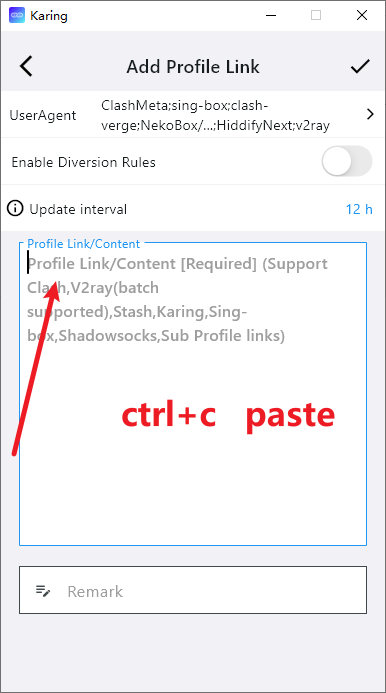
- Copy the file content and import it into the software to use it
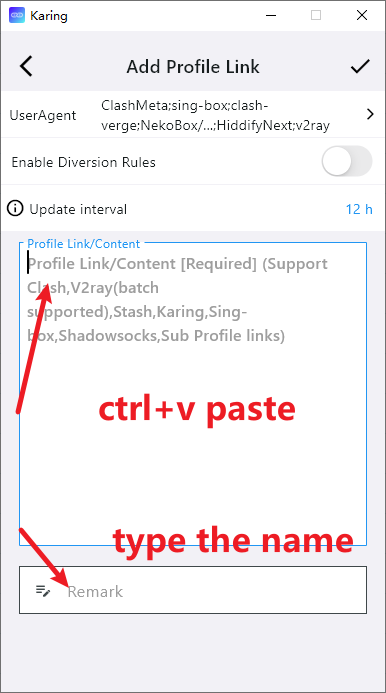
- Paste the node link and enter a name
- Select a node and connect to the network
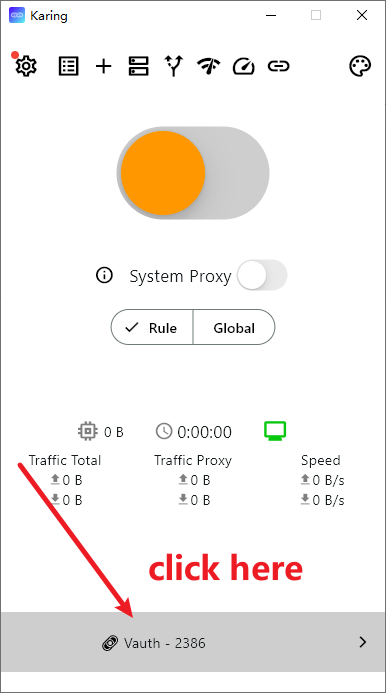
- Return to the homepage and click the ‘Connect’ button
Airport Recommendations #
- The following providers charge based on traffic usage. Their websites include software usage and installation tutorials.
- After purchasing traffic, there is no time limit — the traffic remains valid until it is fully used.
- If a website is inaccessible, it likely means it has been blocked; simply switch to another provider.
| Name | Price | Traffic | Nodes |
|---|---|---|---|
| Mojie | ¥1 | 1GB | 30 |
| Wangji Express | ¥7 | 20GB | 54 |
| Niubi | ¥14 | 200GB | 31 |
| Feitu | ¥30 | 100GB | 80 |
| Nongfu Spring | ¥45 | 200GB | 40 |
| Baobei Cloud | ¥55 | 600GB | 64 |
| Freedom Cat | ¥89 | 200GB | 71 |
| fscloud | ¥99 | 1000GB | 82 |